Contact Center Analytics with Real-Time Call Heatmaps
Increase connect rates with Heatmap Analytics
Trusted by 50,000+ teams to communicate easily
WAKEFIELD
What Is Heatmap Analytics in a Contact Center?
Heatmap analytics is a visual analytics method that displays performance data using color intensity to highlight patterns. In PowerDialer, contact center heatmap analytics show:
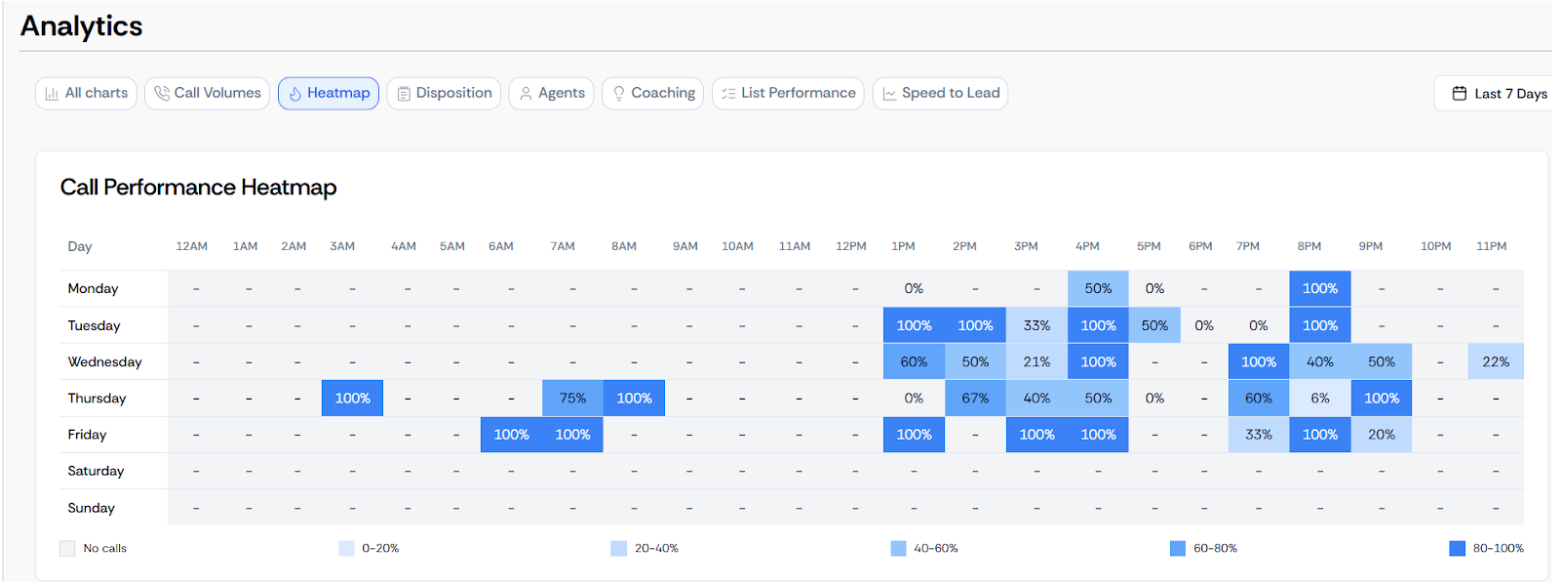
This turns contact center analytics into something teams can act on instantly.
How PowerDialer Heatmap Analytics Works
PowerDialer analyzes every outbound call and plots connection rates across a time-based grid.
Track
Calls are tracked automatically during outbound dialing
Calculate
Connection rates are calculated by time and day
Visualize
Data is visualized using a color-coded heatmap
Darker colors show higher connection performance — teams adjust dialing schedules based on real results.
Why Heatmap Analytics Is a Game Changer
Traditional reports show numbers. Heatmap analytics shows patterns.
Identify Peak Hours
Immediately see when prospects answer calls and which hours outperform others.
Reduce Wasted Effort
See where dialing effort is wasted and how connection rates change by day.
Heatmap Website Analytics
Most heatmap website analytics tools focus on clicks, scrolls, and page behavior. PowerDialer’s heatmap analytics is built specifically for:
- Voice calls
- Contact center workflows
- Sales dialing performance
It answers the question website heatmaps cannot: “When should we call to actually connect?”
Key Benefits of PowerDialer Heatmap Analytics
Find the Best Time to Call
Identify peak connection windows and schedule outbound calls when prospects are most likely to answer.
Improve Call Connect Rates
Reveal high-performing time slots to increase call connection rates without dialing more numbers.
Optimize Agent Productivity
Reduce wasted dialing time, allowing agents to spend more time in live conversations.
Smarter Decisions
Managers use heatmaps to schedule shifts, balance workloads, and set data-driven dialing goals.
Heatmap Analytics vs Traditional Call Reports
| Feature | Traditional Call Reports | PowerDialer Heatmap Analytics |
|---|---|---|
| Data Format | Tables and spreadsheets requiring manual review | Visual heatmap analytics highlighting patterns instantly |
| Pattern Detection | Hard to spot trends across days/hours | Instant pattern recognition using color-codes |
| Analysis Time | Time-consuming exports and filtering | Faster decision-making directly inside dashboard |
| Usability | Requires data expertise | Easy-to-read for sales and contact center teams |
| Actionability | Delays optimization | Enables immediate dialing adjustments |
Use Cases for Heatmap Analytics
Sales Teams
Support AI sales coaching by identifying best calling hours to improve pipeline.
Contact Centers
Optimize staffing schedules using real call connection data instead of assumptions.
Managers & Leaders
Make data-driven decisions faster than relying on static reports.
Revenue Operations
Align dialing strategy with performance trends across teams and time zones.
Frequently Asked Questions
What is contact center analytics?
Contact center analytics analyzes call activity, agent performance, and outcomes to help teams improve efficiency, optimize connection rates, and deliver better customer and prospect conversations at scale.
What is heatmap analytics?
Heatmap analytics uses color-coded visualizations to highlight performance patterns, helping teams quickly identify high- and low-performing calling times across days and hours.
How is PowerDialer different from website heatmap analytics?
PowerDialer focuses on call and voice data, not website clicks, making its heatmap analytics purpose-built for contact center analytics and outbound sales performance optimization.
How does heatmap analytics improve call performance?
Heatmap analytics shows when calls connect most, enabling teams to dial during peak response windows and avoid low-performing time slots that reduce efficiency.
Who should use heatmap analytics?
Sales teams, contact centers, managers, and revenue operations teams use heatmap analytics to optimize dialing strategy, staffing decisions, and overall outbound productivity.